Build your own job analyzer
I’m tired of paying $40/month for LinkedIn to tell me that I’m a “high match” to everything. I apply for the high match, I throw my resume into the void... and nothing. The void ghosts me.
“You match 9 out of 11 qualifications.” Fine, but what am I supposed to do about that? Which gaps will end my application at the first screen? Which ones can I address in a cover letter, and which ones should make me walk away entirely? LinkedIn doesn't answer that. It shows you a number optimized to keep you engaged on the platform.
At some point I stopped waiting for the platform to give me what I needed and just built it myself.
Grab the files from Github
The setup
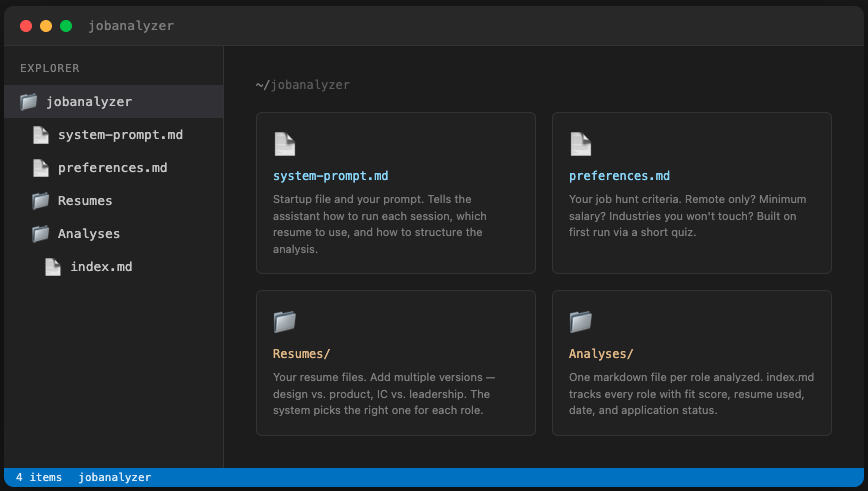
The analyzer runs with any GenAI tool. Paste in a job description, point it at your resume, and it will run a qualification-by-qualification match. Every job requirement gets one of three grades: Strong, Partial, or Gap. Then it scores overall fit as LOW, MEDIUM, or HIGH, telling you exactly which gaps to address and how.
There are four components.
system-prompt.md is the startup file and your prompt. It tells your assistant how to run each session, which resume to use, how to structure the analysis, and what to do with the results. This is what makes the other pieces work together.
preferences.md is your job hunt criteria. Remote only? Minimum salary? Industries you won't touch? You fill this in once via a short quiz on first run, and the system checks every role against it. It's one piece that LinkedIn is missing: a filter to find the jobs that fit your lifestyle, not what the platform thinks is relevant.
Resumes/ is where your resume files live. If you have more than one version, add them all. The system reads the job description first and recommends which resume fits before running the match. (Personally I have a mix of design and product resumes, as well as Director and Principal bullet points.)
Analyses/ is where results go. Every analysis saves as a markdown file, listed by company and role. The index file tracks every role you've run with fit score, resume used, date, and application status. (Application status is the one piece you’ll have to fill in.)
The template
This template is a starting point. Every file has instructions inside it: what it's for, what to fill in, and how it connects to everything else. You HAVE to make this your own if you want it to work. A generic resume and no preferences will give you generic results.
The README walks through three ways to set it up: as a Claude Project, in a plain chat, or in a Cowork session. Pick the one that matches how you already work.
Start with these two things:
Your resume
Add at least one to the Resumes folder before your first session (or as an attachment if you’re using a regular chat.) You aren’t directly using this resume to apply to the role so anything will work. Grab an old resume, download your LinkedIn data, create some bullet points about your current role. Keep in mind: the more specific your resume is, the more specific the analysis will be.
Your preferences
I have this run a short quiz on first launch that asks a few questions. You can keep to those questions or you can build out your own preferences. Want to only work for Series B funded tech startups out of Salt Lake City? Add it to the file. The more specific you are about what you won't do, the faster the system catches roles that will waste your time. You can always revisit this as your job hunt progresses.
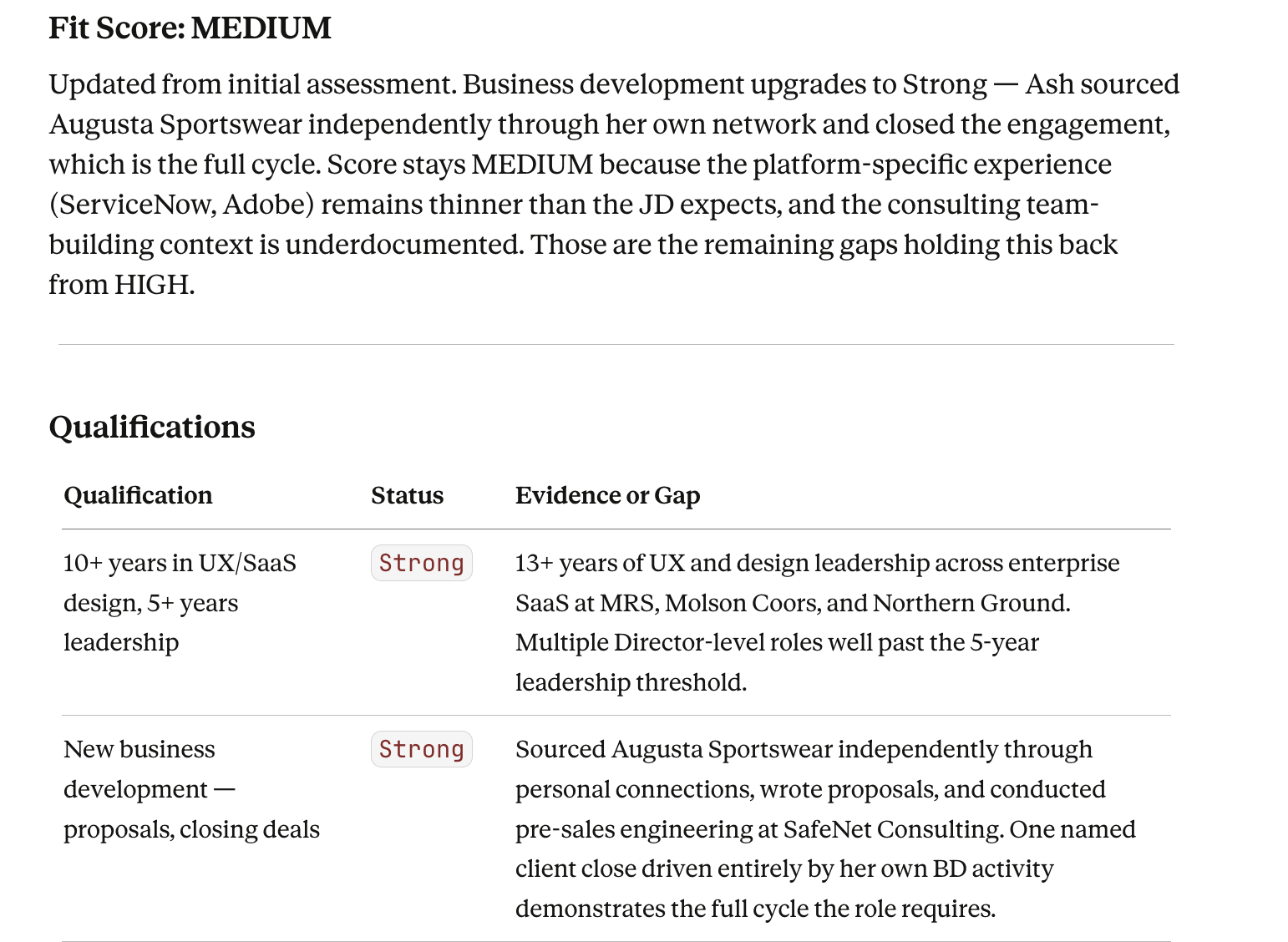
What an analysis looks like (based on my resume and a real job that I applied to)
What's next
If you found this useful, I published a writing assistant last week using the same approach. Give AI the right context and it does the job better than any platform optimized for something other than your outcome.
More job tools coming. All free.
